
See Hilarious Battles Ensue in CATS: Crash Arena Turbo Stars

CATS: Crash Arena Turbo Stars (Free) by ZeptoLab UK Limited is the latest game from the same developers who brought you the Cut the Rope series of puzzle games. If you have been waiting for a new game from ZeptoLab that’s not only different than their usual fare, but also brings cute cats into the mix, then look no further than CATS: Crash Arena Turbo Stars.
When I’m under stress, I like to take a break from reality and chill out with video games. While my usual remedy is a relaxing puzzle game, sometimes I feel a bit more destructive and want to take my anger out on something, which is why I turn to games. While I was never really into things like BattleBots, I know many people are, and I will admit, it can definitely be fun to watch robots fighting each other to the death. I remember growing up when Rock ‘Em Sock ‘Em Robots were a thing, and it was always fun to watch others play or even participate yourself if you could get your hands on the toy. No matter what you’re into, it is just downright satisfying to watch two robotic things just fight each other, so when ZeptoLab announced CATS, I was intrigued — not only did it feature battle bots, but cats pilot them. Seriously, what’s not to love here?

Visually, CATS is stunningly beautiful. The game definitely has a cartoonish aesthetic to it, but that’s to be expected from a game that involves battle bots and cats. Despite the cartoon-like style, there’s a lot of polish involved in here, as you can tell from the incredibly detailed environments and even the facial expressions of the cats themselves. The color palette in CATS has a nice range of muted earthy tones to bolder and more vibrant hues, but no matter what you’re looking at, the game is certainly packed with a lot of eye candy. All of the parts that you can unlock and collect to build your battle bots with have their own distinctive appearances and quirks, so no stone is left unturned when it comes to the game’s details. Animations in CATS are buttery smooth and fluid, and the classic rock soundtrack adds some fun tunes to your hilarious cat battle bot action. Sound effects are just as you’d expect from a game involving customizable battle bots, so it’s all in good fun.
CATS is an arcade-like battle bot brawler, where you can participate in Quick Matches against other bots or go in the Championship Tournamnent. The quick match mode lets you do one battle at-a-time, and if you can get a win streak going, then you have the opportunity to earn boxes with more parts for your battle bots. As far as the championship mode goes, you have to win a certain number of matches out of a set in order to be promoted and move on to the next ranking. However, if you are able to meet the win threshold, then you will also have the opportunity to get bonus boxes that can contain powerful new parts to work with. The meat of CATS is in the bot building, customizing, and upgrading. When it comes to matches, they are automatic and the players have no control in terms of how their bot moves, so the only way to even have a say in the outcome is to make sure you strategically build the best battle bot with the parts you have.
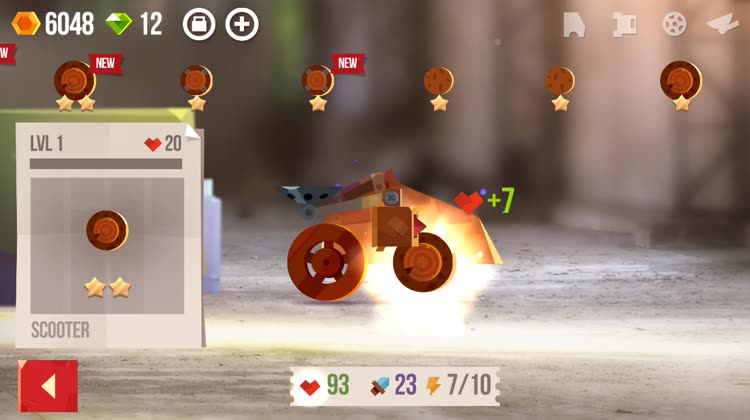
The controls in CATS are simple enough, especially since there is no user input during battles. When you want to customize your bot, just tap on it, which is found in the center of the screen. Then you can scroll through your available parts in a ribbon along the top of the screen, and just tap on the body, weapons, or tires you want to see to view details about it. Each part has a varying amount of health, attack, and power. The power is determined by the body, which also has a set number of health points. The health points can be increased by equipping tires, and your attack increases depending on the weapon you choose, though you’ll have to keep in mind the amount of power a weapon requires too. To equip a part on to your chosen body, just drag it on. Eventually you can fuse parts together to make one piece stronger, and sometimes a piece will offer bonuses when they’re equipped on certain bodies. When you’re satisfied with what you’ve built, just tap on the button to return to the main screen, where you can try out your new creation in a Quick Match or Championship Tournament
Unfortunately, as I mentioned earlier, the battles in CATS are mostly determined by how you built your bot, as well as a bit of luck, so users have no control over how they turn out aside from how they built their bots. Still though, the battles can be quite hilarious to watch, as bots may flip over and be rendered useless or be propelled backwards, or other funny outcomes. After a certain amount of time, bulldozers are revealed on both sides of the screen, and whoever gets hit by the bulldozer first will lose the battle automatically. The health for both bots will show up at the top of the screen, similar to a fighting game.
CATS is a purely player-versus-player (PvP) game, so all of the Quick Match and Championship fights are against other players’ creations. So if your bot appears as an opponent for someone else who is playing, and you win, you also get coins and rewards for successfully defending. On top of everything, the game does have a betting feature where you can place bets on a match, and if you bet correctly, you can get a super upgrade on the part you bet. Unfortunately, after the first tutorial bet, you aren’t able to see which bot is taking the lead in bets, so it becomes a 50–50 chance of winning. But if you like to take chances, this game is full of them.
I’ve only just started CATS, but so far I’m enjoying the experience, aside from the somewhat annoying tutorial in the beginning. I wish that the tutorial was optional, or at least gave you the option to edit your battle bot before your crazy uncle enters you in the tournament, because I was losing constantly for having a bad design and had no opportunity to fix that. Aside from that, the game is gorgeous to look at, the music is fun, and there are a ton of customization options available for you to create your ultimate battle bot. I just wish that there was a way for you to control your bot in battle, but this auto battle mechanic does mean it’s easier to play this game in short bursts throughout the day, at the very least. Plus, it’s just fun to see what you can come up with when it comes to the parts that you manage to get a hold of. I do find the timers for boxes to be a tad frustrating, but the gems that you need to unlock them faster are not too hard to get, but of course you can buy them through in-app purchases if you’re impatient (this is a free game, after all).
I recommend giving CATS: Crash Arena Turbo Stars a try if you’re looking for a fun, pint-size arcade battle bot game. You can find CATS: Crash Arena Turbo Stars on the App Store as a universal download on your iPhone and iPad for free with in-app purchases. The game also has an iMessage sticker pack for your enjoyment.
Source link: http://appadvice.com/reviews


