AppReviewToday- AppReviews

  • Your Brain Will Flip for the Challenging Puzzles of Invert

    Your Brain Will Flip for the Challenging Puzzles of InvertYour Brain Will Flip for the Challenging Puzzles of Invert

    Invert – A Minimal Puzzle Game ($1.99) by Noodlecake Studios Inc and Glitchnap is a puzzle game that is fit for those who love brain teasers, logic puzzles, and even Rubik’s Cube fans. If you enjoyed recent games like Vignettes, Polycolor, or even Trilogic, then you will love what Invert brings to the table.

    When I’m under a lot of stress (which happens to be a lot these days), I like to just sit down and play some games for a while to take my mind off of things, even for just a little bit. Personally, for me, I find puzzles to be one of the best types of games I can play when I need to relax, because they’re usually tranquil enough while being challenging at the same time, since I like to keep my mind stimulated. Though sometimes I do feel like I’ve played the best puzzles that the App Store has to offer, I can’t help but always be on the lookout for new titles that may spring up, and Invert is one of them. What surprised me even more was that it was from Noodlecake Studios, who has other awesome games, like the Super Stickman Golf series, under their belt, so I had to check out Invert for myself.

    Your Brain Will Flip for the Challenging Puzzles of InvertYour Brain Will Flip for the Challenging Puzzles of Invert

    Visually, Invert is just as its name claims to be, which is minimalistic in both form and function. If you’re a fan of minimalism, then Invert is perfect. The game features a flat aesthetic design that is simple and clean while also being pleasing to look at. Invert makes use of a fantastic color palette that features various soft pastels and vibrant hues that compliment each other nicely, and watching the tiles shift color is mesmerizing, to say the least. Animations are smooth and fluid as the tiles flip over and you go from screen to screen, and the atmospheric soundtrack is calming. There’s also some amazing clicking sound effects as the tiles flip and change, so I recommend playing this one with the sound on and a good pair of headphones.

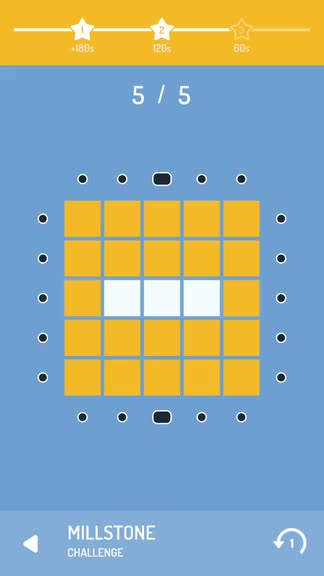
    Like many other great puzzle games, Invert features several different game modes, and each mode contains the same 20 level packs to go through. Despite having the same stages, the modes themselves are all quite different, which just adds to the variety and replay value of Invert overall. The game modes contain: Campaign, Challenge, and Expert. In Campaign, you have a limited number of moves to solve each puzzle. Challenge will have you racing against the clock, but you can use as many moves as you need. Expert requires 100 stars before it’s unlocked, so it’s definitely something you have to strive for before knowing how that plays. The level packs each feature their own unique name, color scheme, and game mechanics that are introduced at the start of each chapter, so the difficulty curve is fairly gradual and never overwhelming. The goal of Invert is simple and straightforward: make all of the tiles on the board the same color using as few moves as possible. Sounds easy enough, right? But like any good puzzle game, things get trickier as you advance. You can check your progress to earning a star at the top of the screen while you’re on a puzzle.

    The controls in Invert are rather intuitive and easy-to-learn. On each grid of tiles, there will be pegs along each row and column, and tapping on these lets you flip that row or column’s tiles over. At first, the game starts off simple, with toggles for each individual row or column. But then you have switches of different shapes that do different things, like the rectangular peg that flips over a 2×3 section on the grid, or the squares that just flip over the tiles in a 2×2 formation in the corner. The grid and tiles even appear in other shapes in later levels, which just add to the complexity of the game’s intricate puzzles. If you ever make a mistake, you can go back one move with the “Undo 1 Move” button in the bottom right corner. Or if you know you messed up more, you can just restart the level (if in campaign) with the restart button that is adjacent to the undo. You can always return to the level select screens by tapping on the back button in the bottom left corner, and the game saves your progress in that pack so you can pick up where you left off.
    Your Brain Will Flip for the Challenging Puzzles of InvertYour Brain Will Flip for the Challenging Puzzles of Invert

    The best thing about Invert is the fact that this is a premium game that contains no in-app purchases. It also relies entirely on your puzzle solving skill, because there are no hints or level skips, so you have to keep at it if you want to make progress. For the most part, this is fine though, since all of the puzzles can be solved through trial-and-error after a few attempts. And while some later stages can prove to be rather tricky, there’s nothing that patience and critical thinking can’t solve.

    I’m still early on in Invert, but so far I’m loving the game, especially as a puzzle fan. The minimal style is aesthetically pleasing, and the colors are eye-catching. However, if the colors are too bright when you play in the dark, there is a Night theme that you can switch to in the menu to turn everything into grayscale, which is a nice addition. The music is soothing as well, so it’s easy to put your attention into solving the puzzles. Controls are intuitive and responsive, the myriad of puzzles can be fairly challenging, and the gameplay mechanics are introduced at a gradual pace that never overwhelms. The only thing that is missing are hints for those who prefer immediate gratification when it comes to puzzle solving, but I think it’s better this way since there’s no way to squeeze more money out of you for hints through in-app purchases or watching ad clips. And as I said, everything can be solved by trial-and-error.

    I highly recommend giving Invert a try if you’re looking for a challenging puzzle game that will give your brain a workout. You can find Invert on the App Store as a universal download for your iPhone and iPad for just $1.99. There are no in-app purchases.

    Source link: http://appadvice.com/reviews

  • Watch Objects Transform Into Each Other in Vignettes

    Watch Objects Transform Into Each Other in VignettesWatch Objects Transform Into Each Other in Vignettes

    Vignettes ($2.99) by Armel Jestin is a relaxing, zen-like exploration game about shapeshifting objects. If you enjoyed other recent titles like Polycolor, KAMI 2, and Cosmic Express, then you will love what Vignettes has to offer.

    Life gets pretty stressful, and I’ve been feeling the pressure lately. Fortunately, I am able to take reprieve in video games across a multitude of platforms, including iOS, which is always on me thanks to my iPhone. Though sometimes I need to vent my frustrations through destructive games like CATS, most of the time I prefer to unwind with something peaceful and calming, such as a puzzle. I heard about Vignettes coming to iOS for a while now, and it was definitely a head-turner because of the unique concept, which is, at least to me, a combination of exploration and puzzle. Now that it has arrived on iOS, I can assure you that it does not disappoint.

    Watch Objects Transform Into Each Other in VignettesWatch Objects Transform Into Each Other in Vignettes

    Visually speaking, Vignettes features a gorgeous minimalistic aesthetic that works out well for what the game is. The graphics are mostly flat, but the objects themselves are able to rotate, so it’s more like a mix of 2-D and 3-D in one. There are hardly any shadows though, so there’s a lack of depth in terms of layering. Vignettes’ objects are pretty simple in terms of their appearance, though you will find more complex items the further you get, but the way they morph into other objects when you hit the correct angle is seamless. The colors used in Vignettes is a nice mix of both soft pastels and bold, vibrant hues that make everything stand out nicely. Color is a big part of Vignettes as well, since it helps dictate the overall mood and tone of objects that you’re working on, and the transitions from color-to-color are fluid. Animations are smooth in the game, so there was no lag on my iPhone 7 during my testing. The game also has a rather soothing ambient soundtrack in the background (it changes depending on the object in front of you), which will help put your mind at ease and allow you to focus, and there are some whimsical sound effects that tell you when an object has changed. Overall, the developer did an excellent job in terms of the visual and audio design for Vignettes.

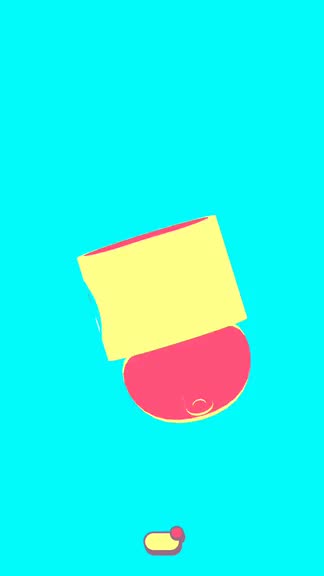
    Vignettes starts off with a treasure chest on the screen, and on your first launch, this chest will morph into other perspectives as you rotate it with your finger. But after this initial experiment, you just tap on the chest to open it and find the last object that you dealt with previously, or the very first object that the game introduces you to, which is a telephone. From there, you just move and rotate the object until you get the proper angle at which the object transforms into another item, and you just keep going until you are able to uncover them all. A line of circles along the top of the screen will tell you your current progress, with found objects being represented by a larger circle. I’m not sure how many objects there are in total to discover in Vignettes, but you can see a map of your object progress by tapping on the button at the bottom of the screen. This lets you check out what the current object branches out into, and if there’s anything left to find, you’ll know because of the “?” symbol. Sometimes you’ll have to think about what the next object may be before you shift into it, because for the most part, the objects are related somehow.

    The controls in Vignettes are incredibly simple and intuitive. Since all you are doing in the game is rotating objects (until you get the shifting angle), you just need one finger to do so. You can drag your finger anywhere on the screen to rotate and twist the object in that direction. You can even use two fingers to rotate it in the 2-D plane. On top of the seamless transitions into other objects, you can interact with each item by just tapping around. Sometimes interactions will change the colors on the screen (affecting the mood and tone), or you hear different sound effects and other cool things. It’s important to interact with the objects because there are also hidden secrets that you can find only through interactions, so if you’re a completionist, make sure to tap, tap, tap!

    Watch Objects Transform Into Each Other in VignettesWatch Objects Transform Into Each Other in Vignettes

    Again, if you want a hint as to how many objects the current one can transform into, just tap on the button at the bottom for an object map. You can also tap on the other buttons to view the item collections (portraits with all related objects that you’ve found), hidden secrets, go back to the start (telephone), or access the game’s menu.

    I believe I’m still pretty early on in Vignettes, but so far the experience has been a pleasant one. I love the unique art style of the game and how everything just flows and melds together without missing a beat. The music is tranquil and perfect after a long day, and the controls are intuitive and responsive. Vignettes may appear simple on the surface, but the game is much deeper than that once you start, and it ends up being hard to stop. Plus, the interactions with some objects provide fun extras, such as rescuing cute cats, time travel, selfies on a mountain, and more. They’re not exactly obvious, but part of the fun is discovering all of these secrets for yourself.

    I highly recommend Vignettes if you are looking for a distinctive and placid object exploration puzzle game. You can find Vignettes on the App Store as a universal download for your iPhone and iPad for just $2.99. There are no in-app purchases and there is even an iMessage sticker pack to boot.

    Source link: http://appadvice.com/reviews