
AppReviewToday- AppReviews

  • Color Your Way to Zen in Polycolor’s Relaxing Puzzles

    Color Your Way to Zen in Polycolor’s Relaxing PuzzlesColor Your Way to Zen in Polycolor’s Relaxing Puzzles

    polycolor ($0.99) by alper iskender is a zen-like puzzle game about shapes and colors. If you’re in the mood for unwinding after a long day and enjoyed recent titles like Trilogic and KAMI 2, then chances are high that you will like what Polycolor has to offer.

    Life gets pretty stressful (especially mine right now), but I have found that the best way for me to relax is with video games of some kind. No matter what platform I choose to de-stress with, it definitely helps take my mind off reality and help me calm down. On iOS, my preferred game genre is puzzle because they’re relaxing yet stimulating at the same time. I’ve mentioned it many times before, but while I like to relax, I prefer to keep my brain stimulated with some challenge so it doesn’t turn into mush. And while I feel like I’ve tried every puzzle game out there, I’m still always looking out for more, and Polycolor is one that intrigued me when I saw it on the App Store. After spending some time with it, I can say that it’s definitely a clever puzzle to unwind with.

    Color Your Way to Zen in Polycolor’s Relaxing PuzzlesColor Your Way to Zen in Polycolor’s Relaxing Puzzles

    Visually speaking, Polycolor features a super minimalistic design that will appeal to people of all types. Everything is rendered in a flat, 2-D aesthetic with plenty of straight lines all around. The game utilizes a dark gray background that makes the vibrant hues of fuchsia, yellow, and cyan blue stand out clearly, and the white lines make it clear where the spaces are that you have to fill in with the three colors. The game has very few animations, as it is mostly just transitions to the next level, but the few times you see animations, they’re pretty fluid. Polycolor also has a soothing, ambient soundtrack that plays in the background, and the whimsical sound effects are a nice touch. Even though Polycolor does not look like too much on the surface, I think the developer did well with the game’s overall visual and audio design.

    Just like many other puzzle games, Polycolor is level-based and has four chapters with 18 stages each for players to make their way through. Even though the game bills itself as a relaxing game, you still have to go through the levels in chronological order, so the stage you’ve unlocked is the one you must clear before you can move on. Fortunately though, the game does not impose any time limits, so you can play each stage at your own pace. The goal of Polycolor is simple: each stage showcases an object that is composed of various polygonal shapes, and you must fill it in with color, but without having one color in two neighboring spaces. Eventually, you must change colors in a set number of moves before it’s cleared. It sounds simple enough, but as you get further in the game, things become a bit trickier.
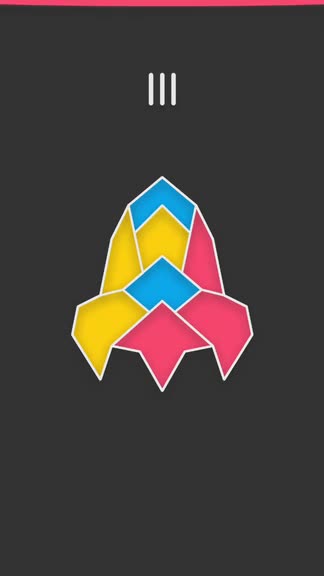
    Color Your Way to Zen in Polycolor’s Relaxing PuzzlesColor Your Way to Zen in Polycolor’s Relaxing Puzzles

    Polycolor has simple controls that are fairly intuitive and responsive. In the beginning stages, the game shows you the three colors along the bottom of the screen, and you can tap on the one that you want to use. However, after the tutorial, these colors no longer show up at the bottom, but you can alternate between all three colors when you tap on a space to fill it in with color. The order goes pink, blue, and then yellow. If you forget the color that is currently selected, you can tell by the thin colored bar at the top of the screen. You can also tap this area to bring up the in-game menu, with options for going back to the title screen, toggling sound or music, or restarting the stage. If you have all of the spaces colored in, but the game does not tell you that it’s complete, it’s because there are two spaces that are next to each other and have the same color. When this is the case, you can go back and change the colors until you get it, or just restart from the beginning. Once all spaces have color and no adjacent spaces are alike, Polycolor tels you and allows you to move on to the next puzzle.

    As stated before, Polycolor is a pretty minimalistic game. I am still in the early stages, but so far the game has proven to be a rather relaxing experience overall. I like the simple and clean visual style, the tranquil music is great and helps you focus on solving the puzzles, and the concept is basic but still challenging. I just wish that the game still kept the colors at the bottom because I feel it’s easier to switch between the colors this way — perhaps it should be considered as an option. Another thing I found weird was the loading times between stages — it seems a bit long for what it is, and I hope that the developer optimizes these loading times in the future. And finally, I would like to see are more levels added eventually, as it would increase the longevity of the game. Other than that, I think Polycolor is a pretty solid release so far.

    I recommend giving Polycolor a try if you are in the mood for a calming puzzle experience. You can find Polycolor on the App Store as a universal download for your iPhone and iPad for just $0.99. There are no in-app purchases.

    Source link: http://appadvice.com/reviews

  • 6 iPhone chat apps you should download today

    Chat 1

    Everyone uses their phone to chat with friends and family. Sure we use our phones to make calls, which remains the central feature of every phone, but there are so many other features that are becoming more widely used than the calling itself.

    Messaging has become an extremely popular and inexpensive medium to stay in touch with loved ones. Just look around you when you’re in a restaurant or bar, it’s very likely that half of the people will be busy messaging someone on their phones.

    From big businesses to 13 year olds, everyone uses messaging platforms for different reasons.

    Thanks to a ton of app developers out there, our choices are endless when it comes to chat apps. Luckily, most of them are free and have a ton of useful and unique features. Here we’re listing 6 of the best:

    WhatsApp

    There is a reason why over 1 billion people worldwide use this app and why it was bought by Facebook for $19 billion. It is extremely easy to setup and use and is designed to be similar to the native messaging app on your iPhone.

    Because it’s free to use and also ad-free and feature rich, it has become a favorite for the majority of people. Users can send texts, videos and image messages, documents and voice notes to other users around the world either separately or in-group chats.

    Recent updates have added features such as voice and video calling too. Making international calls couldn’t get more easier!

    It is great for privacy as there is complete end-to-end encryption between users. The WhatsApp Web feature lets users send and receive messages from their computer browser.

    Skype

    Skype is the second most used chat app across the globe. Besides offering free voice and video calls, it also includes a paid option that lets you call on any number, even non-Skype numbers and landlines anywhere in the world.

    Moreover, you can also use the app for chatting purposes if it’s not convenient for your contacts to have an audio call with you, or if you are in a rush and simply want to get a message across. It lets you send text messages, photos, audio and video files.

    What’s more, since the past two years, Skype has become even more alluring for workplace communication with its new feature Skype for Business. According to Microsoft, it is “a complete, enterprise-grade communications solution at global scale as part of Office 365.”

    The app is also a good substitute for FaceTime due to its cross platform functionality (available for all mobile devices, PCs and even TVs) allowing you to message or video call anyone in the world using any device. It has support for group video calls too, for up-to 25 people.

    Facebook Messenger

    This is an official Facebook app for users who don’t really want to waste time on Facebook, but want to use it to stay in touch with other people. This is one of the best and most useful messaging apps available on the internet simply because of Facebook’s large user base. You can message any of your hundreds of friends on Facebook and also those in your phone’s contact list.

    You can send voice messages, photos, videos, smileys and many unique  stickers and emojis. Voice calls are absolutely free all over the world. You can even use Messenger without a Facebook account by just adding numbers and contacts manually. The app is free but there are paid stickers available.

    You can activate your location to let your friends know if you are nearby and you can alter app settings accordingly to let your friends know if you are available to talk or not. You can just click on a contact while talking to them and the app will direct you to their Facebook page from where you can take a glimpse of whatever is going on in their lives.

    Kik

    Kik has over 300 million users and is one of the best messaging apps available. You can send text messages, pictures, videos and even self-drawn sketches. You can edit pictures in the app itself and send them as memes.

    The best thing about the app is that it protects your privacy. You don’t have to share your phone number or email address with anyone, just your user-name. You can have one on one or group chats and can also make new friends.

    IM+

    This is a free all in one messaging app. Unlike other apps, it’s not a dedicated messaging service, but instead it combines all the features of the various social accounts (such as Messenger, Skype, Facebook) and presents them to you in one platform.

    This app also lets you send pictures and audios but the multimedia messages are first uploaded to IM servers after which the link is then sent from one user to the other.

    Multimedia files can be automatically re-sized if you want to save data. The ’pro’ version comes with a ’neighbors’ function that allows you to find and communicate with new people in your area, who share similar interests. The app has Peer2Peer encrypted messaging to always assure privacy.

    Twitter

    Twitter isn’t an app specifically made for messaging or chatting, but it is good at it. Everyone knows you can send out 140 character tweets which is a really interesting (and creative) way to communicate with your friends and family.

    What’s unique is that you can even connect with people you don’t know if they share your interests. In theory, you could even message your favorite celebrities or other influential people and they could reply.

    Besides sending directed tweets to communicate, you can also DM (direct message) them. Direct message lets you have a private chat with anyone and gives you the ability to also send multimedia files. A unique feature is that it gives you the option of live streaming videos too with the periscope button which you can share with everyone who follows you.

    ***

    AUTHOR BIO

    ABOUT Audrey Throne

    chat 2Audrey Throne is a mother and a professional blogger by choice. She has completed her masters in English literature from university of Birmingham. As a blogger she wrote quite a few posts on health, technology as well as management. Currently, she is associate with citeninja Team.

    Find her on Twitter: @audrey_throne.

    Source link:http://www.theiphoneappreview.com/2017/04/6-iphone-chat-apps-you-should-download-today/