AppReviewToday- AppReviews

  • Create Notes and To-Do Items With Flair Using Markdown in NotePlan

    When you're creating notes and to-do lists, there's usually a fair bit of typing and tapping involved. This is especially true when you want to format your notes and other text, so how do you get around that when you prefer to do everything quickly from the keyboard? Quite simply, you use Markdown. That's exactly what Noteplan has done, but how well does it translate to a to-do list, notes, and calendar app?
    $9.99

    Things 3Things 3

    Things 3

    Cultured Code GmbH & Co. KG

    $39.99

    OmniFocus 2OmniFocus 2

    OmniFocus 2

    The Omni Group

    Free

    Todoist: Todo List for Organizing Work and ErrandsTodoist: Todo List for Organizing Work and Errands

    Todoist: Todo List for Organizing Work and Errands

    Ist Productivity Ltd.

    The first thing you need to understand about NotePlan, if you don't already, is Markdown. Markdown is a syntax language that helps you format text using quick keyboard strokes. NotePlan uses Markdown extensively, both for creating to-do lists and for formatting your notes.

    The "flavor" of Markdown is custom to NotePlan, but it still works outside of the app. You can export your notes and they'll appear nicely formatted, with bold, italics, and bulleted or ordered lists. You can also use the Markdown flavor to schedule events, simply by tapping the clock and then choosing what time you need to complete the action.

    NotePlan is a fully-featured to-do list, calendar, and notes app done in a fresh way: using Markdown. It allows you to create checklists just by making bulleted or ordered lists. The app uses an extended "flavor" of Markdown, meaning it expands on the syntax language's capabilities. For example, you can mark things as completed with a simple keystroke, or use the clock icon to schedule a task. It integrates fully with a built-in calendar, so you can see your day at a glance.

    You can also allow NotePlan to access your other calendars, allowing you to have all of your day's events in one place. This makes it easy to keep track of events that don't really fit into the scheme of a to-do list and notes app, making the calendar feature much more robust and useful than it might be otherwise.

    Since NotePlan uses Markdown, I would have expected it to have a function to export your notes as rich-text format or PDF like other Markdown editors do. Unfortunately, that's not in the current feature set. You can share your notes via Mail, Dropbox, or other apps, but they are just exported as Markdown text files. You have to bring them into another Markdown editor to export them into something more elegant and readable.

    I also couldn't find a way to take advantage of the full power of NotePlan without tapping on icons. I'd love to see some of the same features for keyboard shortcuts in the iOS version as the macOS variant. For example, in the macOS version of NotePlan, you can add "@12:00" to the end of a to-do, and it automatically schedules it for you. With iOS, you have to tap on the clock and then choose the date, with no way to set the time.

    NotePlan is an excellent iOS app for planning your day and large projects, but it could be better. Tighter integration with Markdown, more use of the extended Markdown from macOS in the iOS version, and the ability to export as rich-text files or PDFs would be a welcome addition. Perhaps these features will come in the future. For now, this is a great app but it lacks a bit of polish.

    Creating notes using Markdown

    Creating notes using MarkdownCreating notes using Markdown

    With NotePlan, you can create to-do lists as well as notes, using the Markdown syntax. It's easy to learn, and allows you to export your notes in rich text for gorgeous yet simple documents.

    Add to-do checklists from your notes
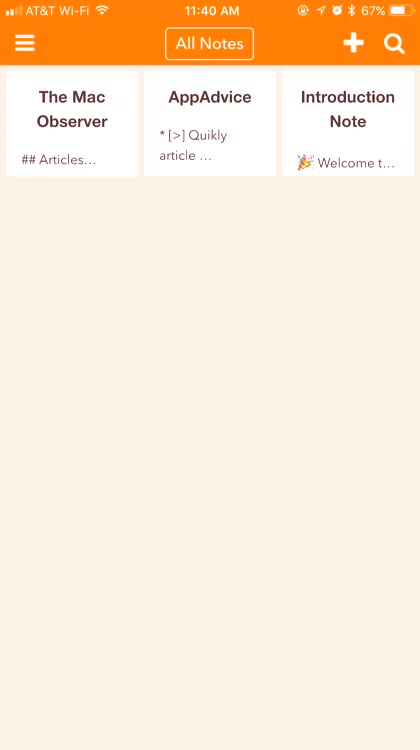
    Add to-do checklists from your notesAdd to-do checklists from your notes

    When you're keeping notes, you can quickly add and schedule to-do checklists without ever leaving your note. Just type the asterisk (*) or tap the button and enter your to-do. You can even schedule it, and it will show in NotePlan's calendar view.

    Schedule your day straight from the calendar
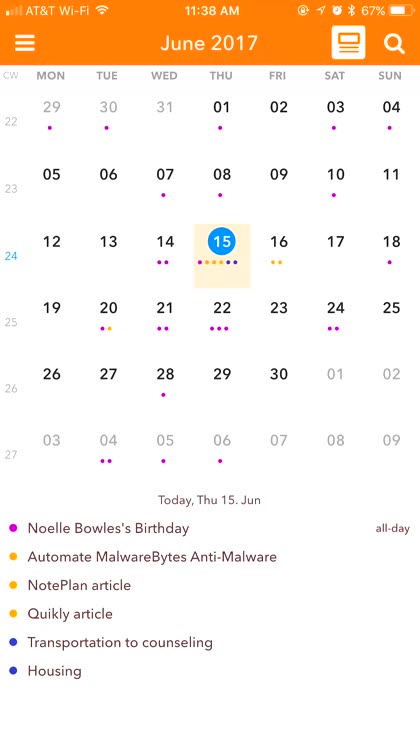
    Schedule your day straight from the calendarSchedule your day straight from the calendar

    NotePlan allows you to schedule to-do items and jot down notes right in the calendar view. Just tap in the bottom of the screen, and you'll go into a note specific to that day. Then type away, creating your to-do list items for the day and keeping notes as you go.

    Easily check off what you've completed

    Easily check off what you've completedEasily check off what you've completed

    It's easy to check off what you've done. Just tap anywhere in that item, and then tap the checklist icon. That marks the item as done, and it shows that way in your calendar view.

    Integration with your existing calendars

    Integration with your existing calendarsIntegration with your existing calendars

    NotePlan can integrate with your existing calendars, so events you add there will show up in NotePlan. It makes for a terrific way to keep track of the day's events and important dates.

    8.1

    OVERALL

    Lasting appeal 9

    Does it well 9

    Is engaging 8.5

    iPhone Integration 7

    User Interface 7
    $11.99

    NotePlan: Markdown Todo-List, Notes and CalendarNotePlan: Markdown Todo-List, Notes and Calendar

    NotePlan: Markdown Todo-List, Notes and Calendar

    Eduard Metzger

    Source link: http://appadvice.com/reviews
  • Should Nymphs & Wets Be Your Go-To App for Fly Tying Techniques?

    When you're first picking up fly fishing, or when you want to up your game, knowing how to tie the knots and make the flies is crucial. After all, you want them to look real enough to attract the big one, and that's not always easy to do. Nymphs & Wets does a great job of showing how to do those things, but does it offer enough to make up for the ads and other in-app purchases? Let's find out.

    App Feels Like

    $1.99

    Knots 3DKnots 3D

    Knots 3D

    David Boren

    $1.99

    Fishing Knots Real 3DFishing Knots Real 3D

    Fishing Knots Real 3D

    Gabor Toth

    $2.99

    DIY Fly FishingDIY Fly Fishing

    DIY Fly Fishing

    Kenneth Sperry

    When learning how to fly fish, the most difficult thing for many people is knowing how to tie flies, knots, and various patterns. It's definitely an enjoyable past-time, and can pay off with some great fish, but you've got to get a start somewhere. This free app will get you this beginning, teaching you the most basic nymphs, wets, and other fly fishing essentials. Once you've mastered those, you can unlock more advanced flies, knots, and patterns and learn them as well. The app uses detailed pictures along with great text to help you get things right the first time and every time.

    When you're trying to learn how to tie a fly, you need a good instructor. This app does provide that, with excellent tutorials on how to tie the flies you need, from the most basic to the highly detailed and complex. It offers various categories of techniques, and gives you a healthy selection of different knots and patterns to make use of.

    If your eyes aren't very good, each image in the tutorials has a zoom function. You just tap on it, and you get a more detailed, larger view of the image and its accompanying text.

    Whether you want to learn the Alexandra, the Black Zulu, or one of dozens of other fly fishing favorites, you'll find them within this app with detailed images and well-written instructions.

    Now, the drawbacks. This app makes heavy use of full-screen advertisements. I'm not opposed to monetizing your app, but the developers seem to have gone hog-wild here.

    With every screen change, you have to wait at least five seconds for an interactive ad to play before you can tap the X to dismiss it and go where you wanted to be in the first place.

    If you're in a hurry to get that fly tied, this isn't the app for you. The ads are annoying enough that I'll be deleting the app from my iPhone in very short order. Then again, maybe I'll forget about fishing and just download one of the games the app keeps pushing on me. Not really, but you get my point.

    Not only does Nymphs & Wets make extensive use of in-app ads, but it tries to monetize in other ways, too. This app has more in-app purchases than I've ever seen in its type before.

    First, there's an in-app purchase to get rid of the ads. That's one purchase.

    You can also spend money to unlock all of the tutorials in each category.

    Finally, the app offers you the option to remove all ads and unlock all of the fly tutorials, for another, heftier charge.

    Truthfully, the ads shouldn't pop up so often. Most apps only have them once or twice a day. The lack of much content also makes this app pretty frustrating.

    This just isn't the app for me, and it's a shining example of what happens when developers get a bit too much on the greedy side. There are far too many ads, and not enough free content, to make this worth the space it takes on my iPhone. Truthfully, it's probably a great app, but I just can't get past all of the ads and other in-app purchases to make the most of it.

    5.4

    OVERALL

    Does it well 8.5

    User Interface 7

    iPhone Integration 5

    Lasting appeal 3

    Is engaging 3.5

    FREE

    Nymphs & Wets: Fly Tying Techniques Knots PatternsNymphs & Wets: Fly Tying Techniques Knots Patterns

    Nymphs & Wets: Fly Tying Techniques Knots Patterns

    Stojan Pesic

    Source link: http://appadvice.com/reviews