XD Entertainment is getting a lot of attention for Torchlight: Infinite at the moment, but shortly before that game released, they also put out a free-to-play roguelite on the App Store. This game, known as Unhappy Raccoon, feels like a mashup of Torchlight: Infinite and Gunfire Reborn, but there are some rough patches in the experience that unfortunately keep it from being a truly satisfying experience.
Raccoon roguelite
Unhappy Raccoon has you choosing one a few anthropomorphic critter heroes to run through increasingly difficult dungeons full of traps and enemies. You can be a cheetah archer or a brutish canine, among other things, and each of these characters have specialized skills that give them unique combat options in these dungeons.
On top of that, your character will also earn upgrades and gear throughout their adventure that may grant specific elemental infusions on their attacks, set bonuses that grant passive abilities like lifesteal, or even little companions that follow you around and help you attack and kill enemies. All of these upgrades come somewhat randomly from completing combat rooms, encountering shops, or defeating bosses, and you need to hone and develop your game knowledge to figure out winning combinations that work with your hero character and current build.
Atypical action
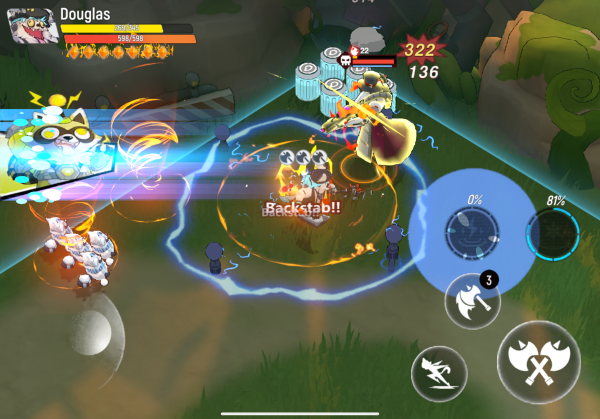
All of Unhappy Raccoon's action emulates that of classic isometric action rpgs, meaning you have an overhead view of your character that you have direct control over for movement and unleashing attacks and special abilities. The amount of things happening on screen at once can get quite chaotic, but Unhappy Raccoon never overloads you with too many active abilities to pay attention to, making it feel very manageable to play despite using touch.
The primary appeal of Unhappy Raccoon is its incredibly varied systems of upgrades and gear. You don't have to get very far into a run to be able to make your character spawn tornadoes when they dash or have access to an ultimate ability that creates a ring of lightning, for example. Mixing and matching all of these powers is fun from both a novel and strategic standpoint, and each new run enables you to try out some new combination of these things.
Rough rodents
Unhappy Raccoon is totally competent at serving up its action roguelite action, but there are a few rough spots across the experience that can be off-putting. The first and most important thing of note is the game's free-to-play design. A lot of weapons and additional characters are only unlockable via in-app purchases, as are character skins, which can grant special abilities that default versions of said characters wouldn't otherwise have. This isn't the worst type of monetization, but it does mean that you only get to experience a subset of the game's main selling point if you choose not to spend money.
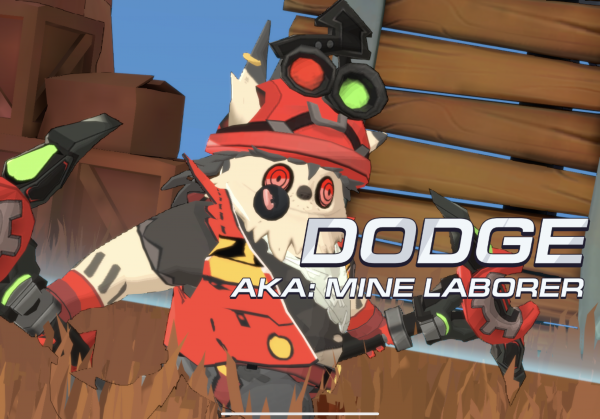
The other big sore spot here is just how ramshackle a lot of Unhappy Raccoon's visuals and user interface are. Stylistically, the game looks pretty sharp, but every character model has literal rough edges and some menus extend beyond the limits of your screen. This kind of visual sloppiness ends up affecting some of the gameplay, too, where it can be hard to tell where you are aiming skill shots or if you are facing an object or enemy in a way that will let you hit it in the way you expect. None of these things make the game unplayable by any means, but they can lead to occasional frustrations.
The bottom line
There are a lot of neat ideas going on in Unhappy Raccoon, and for the most part they justify why you might wade through some of the game's messiness. With how it plays right now, I say it's definitely worth downloading to dink around in unseriously, as it can be easy to have a fun time doing that, but if you want to take on some of Unhappy Raccoon's harder content or explore its free characters, maybe wait to see if it gets some updates to make it a smoother experience first.
Source link:https://www.148apps.com/reviews/unhappy-raccoon-review/
