
Skullgirls, the Fighting Game for Everyone, is Now on iOS
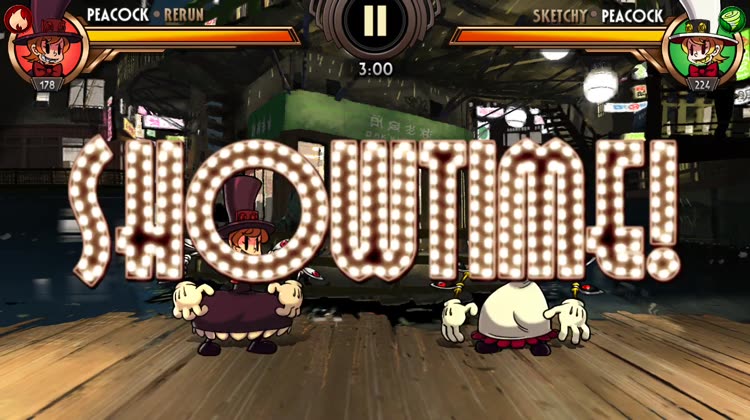
Skullgirls (Free) by LINE Corporation is a mobile port of the original Skullgirls fighting game that came out five years ago. If you enjoyed games like Injustice 2 but want something a bit more unique than just DC characters, then Skullgirls will be right up your alley.
When I’m under a bit of stress, I like to take out my frustrations in the form of video games, for the most part. It’s just easy to watch my troubles go away for a short while in the form of explosions and punches and other fun things that I can’t do in reality. And while I’m definitely not a pro at fighting games, I like to play them just because it’s fun to virtually beat up your foes in a flurry of attacks, and it seems fighters are getting quite popular lately from Injustice 2 and now Skullgirls. To be honest, while I’ve heard of Skullgirls before, I never actually looked into what it was until now. I saw that it was released on iOS last night, and I had to give it a shot because the gorgeous artwork just called out to me, plus hey, fighters are fun (even if you’re not great at them).

Visually, Skullgirls is stunningly beautiful. The entire game carries a hand-drawn anime-like art style that is incredibly detailed and amazing to look at, with everything rendered in 2-D against spectacular backdrops. In fact, the art style kind of reminds me of The World Ends With You, which is not a bad thing at all. Each character in the game (playable or not) has a unique and distinctive appearance that makes them truly stand out on their own, and they have smooth and fluid movement animations in battle, as well as bouncy and bubbly idle animations. The character portraits are drawn nicely, and the color palette in the game ranges from dark and gloomy tones to bold and vibrant hues, so the contrast is done well. The game runs smoothly on my iPhone 7 and I had no performance issues, although the game did crash once while I was still doing background game data downloading, but nothing after that was done. Skullgirls has a rather upbeat and jazzy soundtrack in the background that is delightful to listen to, and it adds another layer of depth to the somewhat steampunk theme. There are also fun sound effects as you engage in battle, and each character has voiced dialogue that you can hear in fights, which only adds to the fun. As someone who has not played Skullgirls before, I’m thoroughly impressed with the visual and audio design of this mobile version.
Even if you played the original Skullgirls game, there’s plenty of reason to play this mobile version as well. At the moment, there are several game modes that are available to all players: Story, Prize Fights, Daily Events, and Training. The developers also note that there will be more game modes coming in the future, so keep your eyes peeled.
The Story Mode is the core of the game, and where you will probably spend most of your time on. This mode will teach you the basics of the game (great for newbies) and also reveal the plot, in which you must find the mysterious Skullgirl before she destroys New Meridian. For those who don’t know, Skullgirls revolves around the “Skull Heart,” which is a powerful artifact with the ability to grant wishes to women. But if the wisher has an impure soul, she is transformed into the “Skullgirl,” which is a monster bent on destruction. Throughout the Story Mode, players will encounter various NPCs as well as play specific fighters that are crucial to the storyline.
Prize Fights are where you can compete against other players to win prizes, which are more fighters for your roster. These battles will be 3v3, so you will want to compose your team to expose the enemy’s weaknesses. Daily Events feature one specific fighter each day, and have different challenges that await you with the opportunity to earn special moves and Blockbuster attacks for that specific character, so you will want to take advantage of them if there’s a main fighter you want to power up. There’s also a training mode if you want to practice with specific characters and hone your technique in real fights.
The controls in Skullgirls mobile are pretty straightforward and intuitive for what it’s worth. To do a basic attack, just tap on the screen. You can do a combo attack by tapping in quick succession. Swipe right to do a dash attack, and swipe left to evade. Swiping down lets you do a low attack, and an upwards swipe lets you get the foe in the air and then you can juggle them with combos. If you swipe up with two fingers, you’ll perform a grab. You can do a charge attack by doing a tap-and-hold on the screen, but be warned — these take a while to charge up and leave you vulnerable, so timing is critical. To block, just tap-and-hold with two fingers on the screen.

Additionally, you’ll have some buttons in the lower left corner of the screen — the button on the outer part lets you perform your Blockbuster move, but only if the gauge is charged (do attacks and blocks to fill it). The other button lets you do your character’s special move, which are stronger attacks that can also have abilities, such as inflicting bleed (damage over time) or break through the enemy’s armor. If you’re a newbie to fighting games in general, there is also a Fight Assist option, which changes the game into a more turn-based strategy fight.
Skullgirls is based on tag team fights for the most part, though some story missions involve only one-on-one battles. To change out the current fighter, just tap on the portrait of the one you want to bring in. When you win a battle, your fighters will gain experience points, even if they may have fallen during the fight. When they have enough experience points to level up, that means you can go into their character detail page and expand their capabilities through the skill tree, as long as you have enough skill points.
You can also get character skills as prizes, and these can be equipped on fighters to gain more options in battle. If you have the gold coin for it, everything can also be upgraded, and fighters can be powered-up by sacrificing unnecessary fighters if you don’t feel like leveling them up the traditional way. While the game’s meat and potatoes is the fighting aspect, there are a lot of RPG elements thrown into the mix, which just add another layer of depth and strategy to everything. Plus, each fighter has an element, and the elements are strong and weak against another, just like rock-paper-scissors. If you have played games like Fire Emblem, then you’ll know exactly what I’m talking about.
When you start out in Skullgirls, you’ll only have a limited selection of fighters to choose from. However, if you have enough Theonite (blue crystal premium currency), you can head to the shop and spend it for Relics, which let you obtain new fighters for your collection. These are completely random, so if you get a duplicate fighter, it’s good fodder for powering up another one.
Even though I was not too familiar with Skullgirls before this week, I think I’m now a fan. The artwork is downright amazing, and I love the voice acting for these lively characters. The music is also catchy and pleasant, and I’m not that big of a jazz fan to begin with. While I still prefer physical buttons for my fighting games, I think Skullgirls did well with the touch screen controls, because they’re not too bad and everything is responsive. The story is interesting and I like that there are multiple game modes so you can always find something entertaining if you need a break from a particular mode. While I don’t think I’ll be using the Fight Assist mode, it’s nice that the option is there for those who usually don’t play fighting games, which make this title truly a “fighting game for everyone.”
I recommend giving Skullgirls a download if you want an awesome mobile fighting game, or if you were already a fan of the Skullgirls. You can find Skullgirls on the App Store as a universal download for your iPhone and iPad for free. There are in-app purchases.
Source link: http://appadvice.com/reviews


