AppReviewToday- AppReviews

  • Create a Pixel Perfect Masterpiece With This New Coloring App

    Masterpiece Coloring (Free) by Simple Simple is a pixel perfect adult coloring book. If you've been wanting a creative new way to find your zen, and you appreciate pixel art, then this may be your perfect match.

    The trend of adult coloring books seems to have died down a bit, at least from what I've noticed. They're still pretty popular among those who use them to relax, but I definitely don't see them mentioned as much anymore. Still, they're fun and tranquil ways to take your mind off of things for a bit. I fell in love with Pigment a few years ago, but I've always wondered — when can I just color in some pixel art? And now I got my wish with Masterpiece Coloring.

    Free

    Pigment – Adult Coloring Book

    Pixite LLC

    Masterpiece has a simple and clean interface that makes it easy to pick up, get some coloring in, and then get out. There's a brief intro that shows up on the first launch of the app, which explains the basics, but then it's out of the way and gone forever. Masterpiece has three sections in the app that are laid out in the bottom toolbar: Library, My Artwork, and Settings. No frills, no fuss to deal with. Just scroll through your selection of pixel drawings, find one you like, and just color. It's simple, fast, and incredibly responsive with no lag. The developers have done an excellent job making this one incredibly accessible for everyone.

    The first step with Masterpiece is to find something to color in. The free download gets you some drawings for free, but you can also opt for the full collection of art with Masterpiece Premium, an in-app purchase subscription. It costs $2.99 per week, $7.99 per month, or $39.99 a year, and grants you access to all art for the duration of your subscription.

    Once you find a drawing that piques your interest, just tap it to select it, and then you're in the Painting screen. Each drawing has a predetermined color palette, and you'll see all of the colors appropriately numbered at the bottom.

    The colors are numbered because they go in certain places for the best result. To see what I mean, perform a multitouch pinching gesture to zoom in on the pixel art, and you'll find numbered boxes, which represent an individual pixel. The colors are labeled as such to show you where they go on the drawing.

    You can tap each block to color the pixel individually, or touch-and-drag to paint in the color as you normally would. If you color out of the boundary, there's haptic feedback to let you know. At the bottom is an undo button, and you can also use the eraser to erase unwanted color. I love the haptic feedback, because otherwise I would not know that I strayed past the lines.

    There's a nice variety of drawings in Masterpiece that range from simple ones with a few colors to more complex and intricate ones with many more hues to paint with. This means you can pick something up to keep yourself busy while waiting around in line or spend a few hours with, nitpicking over every last pixel. It's a good selection and offers something for all skill levels.

    When you finish coloring a drawing, Masterpiece shows you a time lapse video of you painting it. It's fun and entertaining to watch, and you can save the video clip to your Camera Roll. You can also send it to Instagram or share it via the Share Sheet. If you choose to Edit again, you'll erase all the colors and start over. Any finished or in-progress drawings end up in the "My Artwork" section.

    Masterpiece Coloring combines retro pixel art and adult coloring techniques into a true zen experience.

    The Good

    Masterpiece Coloring is a charming and unique adult coloring book that I find simple and intuitive. The app is simple, fast, and incredibly easy to use. The drawings are a nice variety of objects, and there's a nice range for colors to paint with. The celebratory animation when you're finished painting is cute, and the time lapse clips are entertaining.

    The Bad

    While Masterpiece Coloring is a great coloring app, it feels a bit restrictive with the predetermined color palettes for each drawing. I think there should be an option to have your own color palette if you want to truly get creative with things. Hopefully this can be considered in the future.

    I'm also not a big fan of subscriptions for coloring apps, honestly, but the price seems fair if you get a lot of value from the app. Fortunately, Masterpiece comes with over 100 drawings for free, which should keep you busy for a while before you need to consider subbing.

    Another note is the fact that the app is iPhone only, so you can't paint pixel perfect drawings on your iPad for now.

    The verdict

    I tend to get stressed out easily, so I'm always looking for new ways to help me relax. Masterpiece is helpful in doing that, and it's going in my repertoire of things to help me calm down. I love pixel art to begin with, so this coloring app is perfect for my needs. There's a lot of variety too, from simple drawings that only take minutes to more complex ones that require more time. The celebration animation and time lapse videos are also a nice touch, bringing a smile to my face each time. A stylus is recommended.

    I just hope to see the option for custom color palettes in the future. An iPad version would also be perfect.

    Masterpiece Coloring is available on the iPhone App Store for free. There are in-app purchases.

    9.3

    OVERALL

    User Interface 10

    Lasting appeal 9.5

    iPhone Integration 9

    Is engaging 9

    Does it well 9

    FREE

    Masterpiece Color by Number

    Simple Simple

    Source link: http://appadvice.com/reviews
  • Fix the Glitches and Save the World in Reed

    Reed ($1.99) by PXLink and published by Crescent Moon Games is the iOS version of the previously Android-only quick reflexes platformer. If you enjoy other games that require you to be on your feet at all times, such as Temple of Spikes and Thumper: Pocket Edition, then Reed is another game made for you.

    Platformers have been a passion of mine ever since childhood. That's because when you grow up with an NES and Sega Genesis as your forms of entertainment when you're a bored child, you end up playing a lot of different platformer games. While I'll always prefer physical controls for the genre, I still check out the latest platformer offerings on mobile, even though I think the Mikey Shorts games perfected the platformer touch controls. Reed is one of those games that happen to have slipped past my radar in the past, because it's only been on Android. But now that it's on iOS, I had to give a try myself. It's definitely one that doesn't disappoint if you appreciate challenges.

    $5.99

    Temple of Spikes: The Legend

    TIGRIDO, INC.

    $4.99

    Thumper: Pocket Edition

    Drool LLC

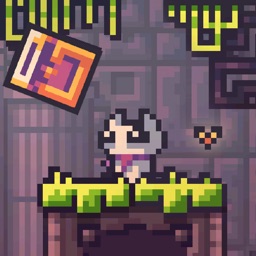
    Visually, Reed is a cute, pixelated gem. The game is rendered fully in 2D with a 16-bit aesthetic, so it serves up that nostalgia nicely. Despite the chunky pixel art, the environments are pretty detailed and nicely textured with some dynamic lighting effects. The color palette in Reed consists mostly of muted, earthy tones with some nice contrasting brights, so it's nothing too crazy but easy on the eyes. The character sprites are adorable and charming, though the game's typeface is like trying to read a foreign language (but that's the point). Animations are smooth and fluid, with no issues of lag or choppy frame rates on my iPhone 8 Plus. The ambient soundtrack is rather atmospheric, creating a soothing and immersive experience.

    In typical platformer fashion, Reed is level-based, and players must clear each stage before moving on to the next. It's fairly linear, with no option to skip ahead. And with the challenging twitch-like reflexes that are needed, sometimes it may take a while before you clear that roadblock. Believe me — you're going to fail and die in this game quite a bit. But it's easy to get back up and try again, since it's literally just a tap away.

    The story of Reed is pretty interesting. Players control Reed, who is a tiny cat-like creature and last creation of an old supercomputer. But the supercomputer is experiencing glitches and slowly dying, as the cubes have escaped. Without the supercomputer, the world will end. It's up to Reed to collect the cubes, fix the glitch, and save the world.

    The goal in each stage is straightforward enough: collect the cube and reach the exit portal that opens up upon collection. But there's plenty of traps, obstacles, and other dangerous critters (like chickens) that stand in your way, so it's all easier said than done. For completionists, there are even secret levels to find, which add to the replay value.

    Controls in Reed are fairly easy and intuitive. The two buttons in the bottom left allow for horizontal movement. A button in the bottom right lets you jump, and you can double tap it to jump again in midair.

    But since the game revolves heavily around being fast and having good reflexes, the controls sometimes work against you. Timing is everything, and sometimes the game doesn't register my touch in time to avoid being shot by an arrow. Or you move too fast and take an extra step and fall off a ledge and into a pit of spikes. The sensitivity on the controls is either too low or too high, at least for me, so I would like to see optimization made in the future, or at least give players some customization. This would also be a great game to play with MFi controllers, so hopefully support gets added for that.

    A hardcore retro inspired platformer.

    The Good

    Reed is a challenging platformer that is not for the faint-of-heart. You need to be fast and skilled to survive in this tough-as-nails gam. It feels so rewarding once you get past that tough level you've been stuck on. The graphics are charming, pleasant, and the sound is excellent. There are plenty of levels to keep one busy for a while too, which is nice.

    The Bad

    While Reed is a great option for those who like challenging games, it's not for those who get frustrated easily. The controls also do feel wonky at times, and for a game that requires skillful reflexes, that's a little disappointing. Hopefully the controls can be further optimized and streamlined for flawless play.

    The verdict

    As someone who likes a challenge, Reed is an excellent addition to the iOS platformer game collection. I find Reed's cat-like creature to be endearing and rather fitting, seeing as how the internet loves cats. The graphics are a nice tribute to the old classic games, and the tranquil music helps you focus on the game.

    While the controls work for the most part, they do feel a bit off at times. However, I'm sure that it just requires more patience and practice as well, but still, customization for button placements and sensitivity would be nice.

    Reed is available on the App Store as a universal download for your iPhone and iPad for just $1.99. There are no in-app purchases.

    8.5

    OVERALL

    Sound/Music 9

    Replayability 8.5

    Game Controls 8

    Graphics 8.5

    Gameplay 8.5

    $1.99

    Reed ^_^

    Crescent Moon Games

    Source link: http://appadvice.com/reviews