Pop All of the Tiny Bubbles in this Delightful Puzzler
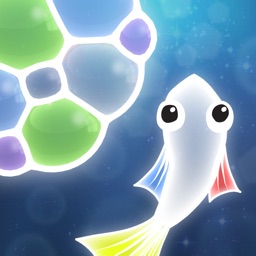
Tiny Bubbles ($2.99) by Pine Street Codeworks is a relaxing physics-based puzzle game that lets you play at your own pace. If you enjoyed games like Level 24 and Ruya, then you'll get a kick out of Tiny Bubbles.
While I consider myself a gamer, one of my favorite genres to play are puzzles. There's nothing quite like being able to relax and keep my mind busy at the same time, you know? Though I've gone through most of the puzzle games on the App Store by now, I can't help but keep my eyes peeled for new ones that hit the market. And Tiny Bubbles is definitely one of my new favorites.
Level 24
FLG DEVELOPMENT, OOO
Ruya
MIRACLE TEA STUDIOS LTD
Visually, Tiny Bubbles is impressive with it's offering of a cute and whimsical cartoon style art and bright colors. And if you're colorblind? Don't worry, Tiny Bubbles has a mode for color blind players, and there's also a Dark Mode for more contrasting hues too. Everything's rendered in 2D with smooth, fluid animations that don't lag on my iPhone 8 Plus. The ambient music is atmospheric and immersive, and the sound effects of popping bubbles is zen-like.
Like most puzzle games, Tiny Bubbles is level-based. There are different chapters full of puzzles to solve, but there's an infinite mode as well. Each stage in Tiny Bubbles has a different objective that you must complete before it's considered cleared. These goals range from just popping all of the bubbles to having just enough bubbles to fill a target area, and much more. And to make things more challenging, you'll only have a certain number of moves to do it all in. However, there is no time limit or stars to earn, so you play at your own pace.
The controls in Tiny Bubbles are simple. At the top of the screen are the moves available to you, which includes colors that you fill bubbles in with, or abilities like scissors to cut the bubble outlines. To fill in a bubble with that color, just tap it. To use the scissors for cutting, just tap on the line you want to cut. Bubble physics takes care of the rest.
Eventually, you get to the point in Tiny Bubbles where you'll need to combine colors to get another color. Just tap on a colored bubble to mix the colors together and create a new shade. When you forget what colors create what, just long-press a bubble to see what colors it's made with. And when you cut the outline of a bubble, it can blend with another bubble, or pop entirely if you cut the external line.
Also, you'll encounter a fish named Bloopers. It blows bubbles that get added to the existing bubbles, thus adding another layer of challenge to the overall game. It can either add one bubble after you make your move, or blow continuous bubbles, so you need to think fast.
To clear out bubbles in Tiny Bubbles, you must make matches of like-colored bubbles in groups of four or more. Once bubbles pop, more cool bubble physics happen and everything shifts around and melds together. And with the 60 frames-per-second framerate, these bubble physics are just super fun to watch.
The game always tells you the objective before you begin, and there are hints if you get stuck. And even though it's level-based, you can choose to play stages as they open up (multiple paths get unlocked sometimes), so it's not too linear. New elements get introduced along the way, but the game does a good job of explaining each one as you go.
As far as the endless mode, you unlock it after a certain point in the game, but it's pretty early on so not too hard to obtain. After that, you earn "tickets" to play it after a certain amount of time, and once you're out of moves, you'll need to wait for more tickets. It's not the best implementation of an endless mode, but it's decent since you can spend the downtime playing the regular stages.
Even for the most casual gamer, it’s hard to go wrong with Tiny Bubbles. The gameplay is simple and accessible, and the music and visuals are stunning.
The Good
Tiny Bubbles is an excellent puzzle game for any fans of the genre. The graphics are stunning, especially Dark mode, and the frame rate is as smooth as butter. The music is soothing and delightful to listen to as well. I also love the sound effects, as they're whimsical yet still fairly realistic. The gameplay is simple enough for anyone to pick up and enjoy, but it's still quite challenging. The variety of objectives keep things fresh and interesting, and the endless mode is something to look forward to while you play.
The Bad
While Tiny Bubbles itself is a fantastic game, I'm not sure I like the way endless mode is set up. I believe it should be a standalone mode that lets you do just that — play infinitely, as long as you want. I was a bit annoyed to discover that I'd need to wait for tickets to play it, because that's just not endless, in my opinion. Still, I suppose it's not too bad, since the regular puzzles are fun to play as you wait for tokens.
The verdict
Tiny Bubbles is a welcome addition to my ever-growing collection of iPhone puzzle games. I'm in love with the unique visual style and sound design. The gameplay is interesting since it combines Tetris-like mechanics with physics puzzles, and knowing your color combinations is a true test. I just wish endless mode was truly endless, but the rest of the game is top notch.
You can find Tiny Bubbles on the App Store as a universal download on your iPhone and iPad for $2.99. There are no in-app purchases.
9.5
OVERALL
Graphics 10
Sound/Music 10
Replayability 9.5
Game Controls 9
Gameplay 9
Tiny Bubbles
Pine Street Codeworks LLC
Source link: http://appadvice.com/reviews